Product Demo
Using AI Auto-Contours Effectively
Significant time-savings are possible with AI auto-contouring. However, there may be instances where contour edits are needed to adjust them to your liking. Any minor edits can be done quickly and efficiently using Contour CoPilot®, a tool unique to Contour ProtégéAI+.
Field
Radiation Oncology
Organization
MIM Software Inc.
Country
USA
Tools Used
Contour ProtégéAI+™
In-Focus
Two Ways Contour CoPilot Can Be Helpful
Example 1
Lung: 2D Fill Tool + Contour CoPilot
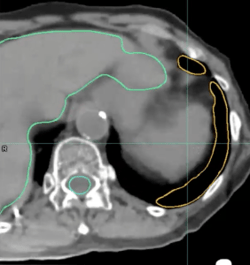
With Contour ProtégéAI+, a majority of the slices in the lung contour are accurate without manual work, saving significant contouring time. In this example, however, a few slices at the bottom of the lung — represented here with the yellow contour — need to be adjusted.

The 2D Fill tool is used to correct the contour on one slice due to a steep drop-off in Hounsfield units. With Contour CoPilot, the corrected contour can be instantly deformed to the next slice with one click.
To complete the process, Contour CoPilot is used to correct any remaining adjacent contours.
Example 2
Liver: 2D Brush Tool + Contour CoPilot
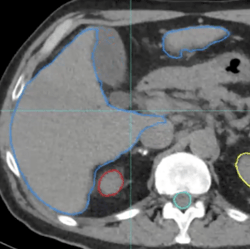
In this instance, an adjustment is necessary on separate sections of the liver contour.
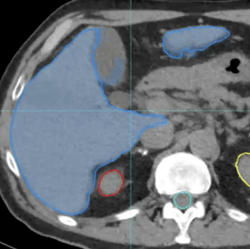
To remedy this, the 2D Brush tool is used with Contour CoPilot to make a quick adjustment on a few slices.
Tools for quick AI auto-contour refinement, such as Contour ProtégéAI+, make AI auto-contouring clinically useful with significant timesavings.
Download the PDF Version